User Components
The final output of this example could be found here.
User components are the components that are mostly used. A user component should be attached to a specific scene, then it can only be used in that scene.
To understand the usage of the components better, let's make an example.
# Create a new scene named Components
messenger scene Components

# Create a new type of component in Components scene
messenger component -i Components Rect

# Create a new layer with components in Components Scene
messenger layer -c Components A
-i argument automatically creates a Init.elm file for the component to store the initialization data type.
In addition to setting the data type of Rect, it is necessary to set the data type for initializing a Rect. For simplicity, here we assume that the initialization data type is the same as the actual data type of Rect.
Since we would like to determine the position, size, ID and color when initializing, we could add codes in Scenes/Components/Components/Rect/Init.elm:
type alias InitData =
    { left : Float
    , top : Float
    , width : Float
    , height : Float
    , id : Int
    , color : Color
    }
Then add the message type for initialization in ComponentMsg:
import Scenes.Components.Components.Rect.Init as RectInit

{-| Component message
-}
type ComponentMsg
    = RectInit RectInit.InitData
    | NullComponentMsg

{-| Component target
-}
type alias ComponentTarget =
    Int
Note that we changed ComponentTarget to Int because we want to distinguish each rectangle with an ID.
Then draw a rectangle based on the component data in the view function. But it will not be rendered on screen now since it has not been added to any layer yet. So let's add two components when initializing the layer A and render them using viewComponents:
import Scenes.Components.Components.ComponentBase exposing (BaseData, ComponentMsg(..), ComponentTarget)
import Scenes.Components.Components.Rect.Init as RectInit
import Scenes.Components.Components.Rect.Model as Rect

...

init : LayerInit SceneCommonData UserData LayerMsg Data
init runtime env initMsg =
    Data
        [ Rect.component (RectInit <| RectInit.InitData 150 150 200 200 0 Color.blue) runtime env
        , Rect.component (RectInit <| RectInit.InitData 200 200 200 200 1 Color.red) runtime env
        ]
Now one red rectangle on a blue rectangle is on the screen.
Then try to add a simple logic that when you left-click the rectangle, it turns black:
update : ComponentUpdate SceneCommonData Data UserData SceneMsg ComponentTarget ComponentMsg BaseData
update runtime env evnt data basedata =
    case evnt of
        MouseDown 0 pos ->
            if judgeMouseRect pos ( data.left, data.top ) ( data.width, data.height ) then
                ( ( { data | color = Color.black }, basedata ), [], ( env, False ) )

            else
                ( ( data, basedata ), [], ( env, False ) )

        _ ->
            ( ( data, basedata ), [], ( env, False ) )
Message Blocking
Our code seems to work well when we click the non-overlapping part of the two rectangles. But when we click the overlapping part of them, both of them turn black, which is not expected. The issue has been mentioned in events. So we can solve this problem by changing the block value from False to True.
( ( { data | color = Color.black }, basedata ), [], ( env, True ) )
What if we add a layer B to the scene? Create a new layer B:
messenger layer -c Components B
Then add it to the scene. Note to put B before A in the layer list so that layer A will update before B and render after B. See layers and events.
Add two rectangle components to B in position (100, 100) and (250, 250) with size (200, 200), which means they will be overlapped by the components in A. Left-click one component in A, the components in B do not turn black. It shows the block indicator will be passed by the order of updating.
Message Communication
The work we did until now is just to update the component itself. But how to communicate with other components and layers? Let's add a logic that when the user clicks one rectangle, the color of the next one turns green.
First of all, create a file Components/Rect/Msg.elm to store message types for Rect. Since the only message needed to pass is the color to change, add:
import Color
type alias Msg =
    Color.Color
Then add it to ComponentMsg in ComponentBase.elm:
import Scenes.Components.Components.Rect.Msg as RectMsg
type ComponentMsg
    = RectInit RectInit.InitData
    | RectMsg RectMsg.RectMsg
    | NullComponentMsg
How a component reacts to the messages is determined by updaterec:
updaterec : ComponentUpdateRec SceneCommonData Data UserData SceneMsg ComponentTarget ComponentMsg BaseData
updaterec runtime env msg data basedata =
    case msg of
        RectangleMsg c ->
            ( ( { data | color = c }, basedata ), [], env )

        _ ->
            ( ( data, basedata ), [], env )
Since the message is going to be sent from one component to the other, the target and matcher need to be changed.
Modify the matcher for the component:
matcher : ComponentMatcher Data BaseData ComponentTarget
matcher data basedata tar =
    tar == data.id
The update function also needs to be updated so that it can send a message to other components when the mouse left-clicks.
( ( { data | color = Color.black }, basedata ), [ Other ( data.id + 1, RectMsg Color.green ) ], ( env, True ) )
Run make and see the result now!
When you click a component in one layer, the components in the other layer won't change their colors. So components cannot directly communicate across layers, they have to send messages to each other via their parent layer.
Now the issue is to communicate between layer and component. Sending a message to components from a layer is similar to sending from component. But a layer cannot directly deal with the messages from components in updaterec because the updaterec function of the layer is used to handle the message from other layers.
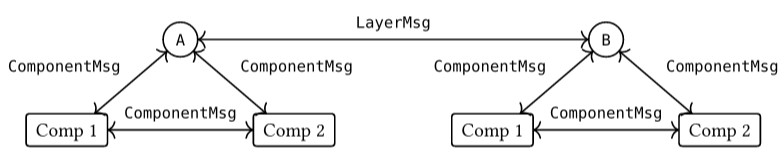
Therefore, a handler for the messages from components should be added.
First, create a new message type for communication between component and the layer in Msg.elm:
type alias RectReportMsg =
    Int
And add that to ComponentMsg:
type ComponentMsg
    = RectInit RectInit.InitData
    | RectMsg RectMsg.RectMsg
    | RectReportMsg RectMsg.RectReportMsg
    | NullComponentMsg
Finally we can simply modify the handler provided by default:
handleComponentMsg : Handler Data SceneCommonData UserData LayerTarget LayerMsg SceneMsg ComponentMsg
handleComponentMsg runtime env compmsg data =
    case compmsg of
        SOMMsg som ->
            ( data, [ Parent <| SOMMsg som ], env )

        OtherMsg msg ->
            case msg of
                RectReportMsg rm ->
                    let
                        _ =
                            Debug.log "RectReportMsg" rm
                    in
                    ( data, [], env )

                _ ->
                    ( data, [], env )
In this way, components and their parent layer can communicate easily.
z-index
Notice that the red rectangle is on the top of the blue one now. How to reverse their order to make the blue one on the top? A very simple way is to directly change their order in the initial list in the layer. Since the render order depends on the order in the list by default, the render order reverses in this way.
However, this method doesn't work in some cases, especially when a new component is added during the game or the render order needs to be changed during the game. These are the situations where z-index should be used.
Users can decide the z-index dynamically based on data or environment in the view function. Take the previous issue for example, the requirement can be implemented by adding a new value order in data which determines the z-index.
Parent Interfaces
In some situations, the parent of components may need to operate on them directly, without message passing, to avoid unnecessary redundancy and latency. For example, deleting a component or accessing its position.
However, since the components are stored as abstract types, the operations available to the parent are limited. Essentially, the parent can only access what the abstract type exposes: update, updaterec, view, matcher, baseData.
update, updaterec and view are rarely used. The useful interfaces are matcher, which is usually used to identify the component, and baseData, which allows the parent to access the base data of a component.
Before operating on a component, it should be unrolled since the abstract types are rolled to enable delayed evaluation. Messenger provides an unroll function to convert an abstract-typed component into its unrolled form.
For example, to access the position value stored in the baseData of a component comp, users can use:
(unroll comp).baseData.position
To write a function that checks whether a component is of type "Enemy":
\comp -> (unroll comp).matcher "Enemy"
Most of the time message passing is sufficient for interaction between a component and its parent. Avoid overusing baseData for easy accessibility.
baseData is type-shared but data-independent. commonData is type-shared and data-shared.
For baseData, each component gets a copy of the data, but for commonData, all components share the same data.
baseData interface is intended for performing operations across all components.
baseData could be read by unroll an abstract component. However, you cannot modify a component's baseData by changing it using unroll and Roll. It does not work as you expected. We may add a feature to correctly modify baseData in the future for convenience, but for now, please still send a message to the component and modify the component inside the update handler of the component.