Initialization
Users may want to initialize the layer or the scene with special data and may even with some environment information.
The data to initialize a layer or a scene must be defined in the layer messages or the scene messages. The layer will be initialized by that message.
We can investigate the init function in layer:
LayerInit SceneCommonData UserData LayerMsg Data
which expands to:
Runtime -> Env SceneCommonData UserData -> LayerMsg -> Data
So users can initialize a layer with the read-only runtime, the writable environment, and a layer message.
Users can create an Init.elm file to store the initialization type for scenes, layers and components (Init.elm is automatically created for scene prototype). Messenger CLI provides an argument to add that file when creating a scene, a layer, or a component:
# Use --init or -i
messenger scene ... --init
messenger layer ... --init
messenger component ... --init
For example, if you run:
messenger scene Home --init
Then Scenes/Home/Init.elm will be created with empty InitData.
Users should know the dependency relationship clearly between all the modules, especially the Init modules, or they may run into cyclic dependency problems.
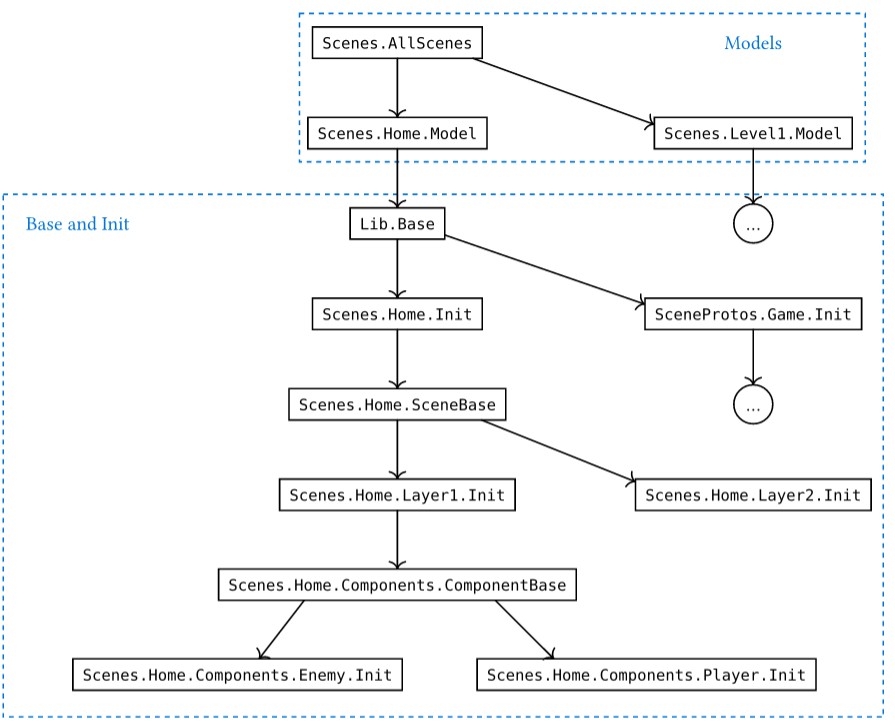
In the above diagram, A B means A may depend on B, and B must not depend on A.
As you can see, all the models can depend on all the Base and Init. So it's quite free to import any types you defined.
However, in the "Base and Init" zone, you should carefully handle the dependency. The rule is: upper level may depend on lower levels. Never use Lib.Base in any Base or Init. If necessary, use a type parameter and instantiate it in models (see the Scene Prototype Example).