Messenger Model
The concept of the Messenger model is summarized in the following diagram:
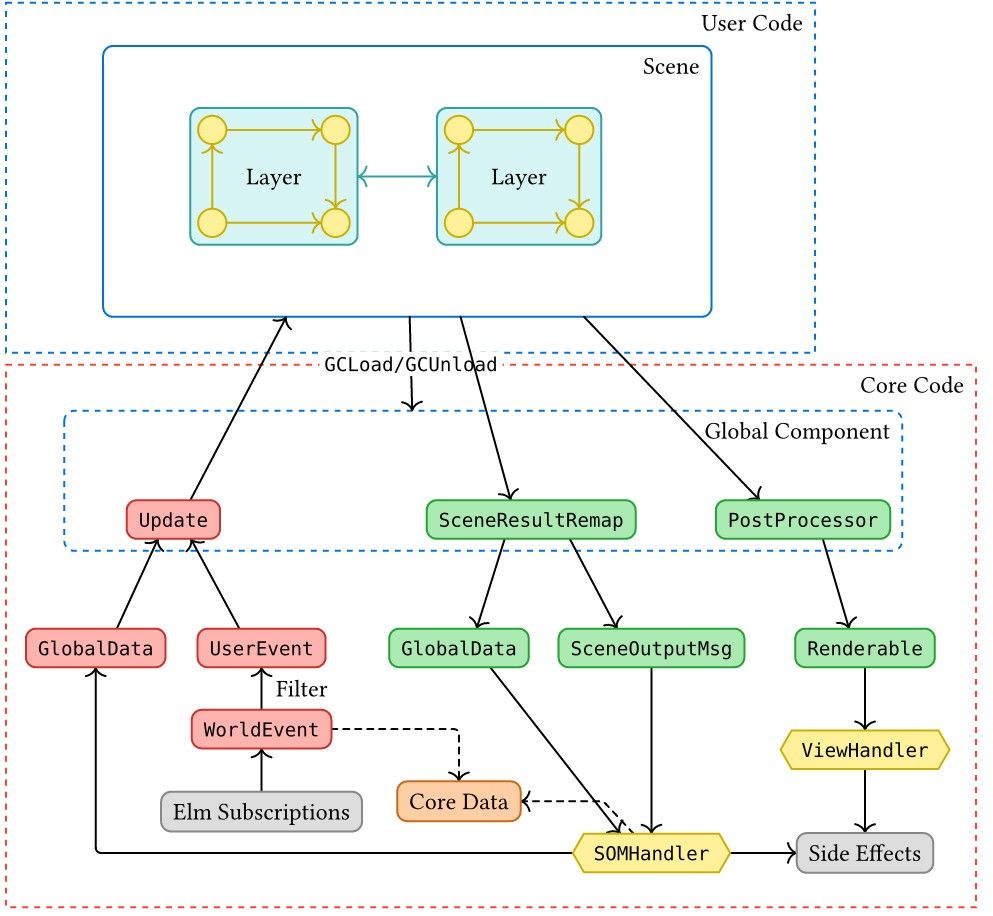
Messenger provides two parts for users: the templated user code and the core code. Users write code based on the template and may use any functions in the core library. In user code, users need to design the logic of scenes, layers, and components. Logic includes the data structure it uses, the update function that updates the data when events occur, and the view function that renders the object. Messenger core first transforms world events into user events, then sends those events to the scene with the current writable globalData plus a separate read-only runtime. globalData is the user-owned data structure Messenger keeps between scenes. Users can write user-owned fields such as userData, extraHTML, canvasAttributes, and camera; engine-owned runtime values are read through getter functions. The user code updates its own data and generates some SceneOutputMessage ("SOM" in short).
SOMs are something like system calls in OS which are the top-level APIs.
Messenger core ("core" for short) will handle all SOMs and update the engine-owned runtime (e.g., the current timestamp) so that users could read it safely.
Messenger manages the game through three levels of abstraction (users can create more levels if they want), listed from parent to child:
- Scenes: A scene represents a collection of elements that make up a part of the game at some point in time. The core runs one scene at a time. Example: a single level of the game.
- Layers: One scene may have multiple layers. Example: the map of the game and the character layer.
- Components: One layer may have multiple components. The small yellow circles in layers in the diagram are components. Example: bullets a character shoots.
Parent levels can hold child levels, while child levels can send messages to parent levels. Messages can also be sent within a level between different objects.
A scene may have no layer (called a raw scene) and a layer may contain no components. However, a layer must be attached to a scene.
To run multiple scenes simultaneously, users could use the VSR technique to emulate a scene.
General Model
There are many similarities among scenes, layers, and components. Messenger abstracts those objects into one concept called the general model. Scenes are not general models as they are special, but they are similar to general models.
One of the most important features of Messenger is its flexibility, i.e., users can define their own datatype for their general models. However, if the layers or components in one scene are not of the same type, how can the core update them?
The key is that although the data of general models differs, the interface or actions on those objects are the same. For example, the update function is the same for all layers in one scene. As an analogy, an abstract class in OOP may define many virtual functions, and derived classes implement those functions with their own data structure and implementation details. It is possible to convert a derived class instance to a base class instance and only use the base class interface. The type of the base class is the same, while the derived classes may have different types.
In Messenger, the "derived class" is a concrete object that users implement, and they can use whatever datatype they want. The "base class" is an abstract object that "upper-casts" the concrete object. Therefore, users can store different types of objects together in a list by casting them to their abstract form.
However, unlike in OOP, it is impossible to downcast an abstract object to a concrete object. Therefore, users should only upper-cast at the last moment.
Layers and components are defined as an alias of AbstractGeneralModel. It is generated by a ConcreteGeneralModel, where users implement their logic. Its definition is:
type alias ConcreteGeneralModel data envro env event tar msg ren bdata sommsg =
    { init : envro -> env -> msg -> ( data, bdata )
    , update : envro -> env -> event -> data -> bdata -> ( ( data, bdata ), List (Msg tar msg sommsg), ( env, Bool ) )
    , updaterec : envro -> env -> msg -> data -> bdata -> ( ( data, bdata ), List (Msg tar msg sommsg), env )
    , view : envro -> env -> data -> bdata -> ren
    , matcher : data -> bdata -> tar -> Bool
    }
Don't worry about so many type parameters! They are straightforward after understanding the functions.
The functions in ConcreteGeneralModel define the core behavior of a general model:
-
initinitializes the object. -
updateupdates the object when an event occurs. -
updaterecupdates the object when other objects send it a message. -
viewgenerates the view. -
matcheridentifies the object itself.
The type parameters in ConcreteGeneralModel have the following meanings:
-
envrois the read-only environment type. In Messenger-specific aliases this isRuntime. -
envis the writable environment type. In Messenger it contains global data and common data, if any. -
eventis the event type. -
datais the user-defined datatype. -
bdatais the base data used in components (see Component). -
renis the rendering type. -
taris the target type used for matching. -
msgis the message type. -
sommsgis the scene output message type (see SOM).
ConcreteGeneralModel is the most generic form of a general model. Messenger mostly uses its applied form:
type alias MConcreteGeneralModel data common userdata tar msg bdata scenemsg =
    ConcreteGeneralModel data Runtime (Env common userdata) UserEvent tar msg Renderable bdata (SceneOutputMsg scenemsg userdata)
Messenger CLI will use templates to help you create scenes, layer and components. You usually don't need to construct a concrete object from scratch.
Message Model
Messages are the most fundamental component in Messenger. Almost all the other components rely on messages to communicate.
The Msg type of Messenger is defined as below:
type Msg othertar msg sommsg
    = Parent (MsgBase msg sommsg)
    | Other (othertar, msg)
where MsgBase is defined as
type MsgBase othermsg sommsg
    = SOMMsg sommsg
    | OtherMsg othermsg
Parent represents messages sent to the parent level (e.g., from a component to its layer or from a layer to its scene).
Other represents messages sent to another target within the same level.
SOMMsg, or Scene Output Message, represents messages that can directly interact with the core. For example, to play an audio, users can emit a SOMPlayAudio message, and the core will handle it.
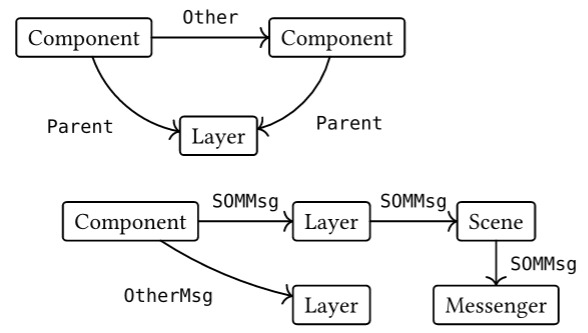
SOMMsg is passed to the core from Component Layer Scene. It's possible to block SOMMsg from a higher level. See SOM to learn more about SOMMsgs.
Example
A, B are two layers (or components) which are in the same scene (or layer) C. The logic of these objects are as follows:
- If A receives an integer , then A will send and to B, and send to C.
- If B receives an integer , then B will send to A.
Now at some time B sends to A, what will C finally receive?
Answer: 2, 5, 3, 8, 0, 9.