Advanced Component Management
Components are the most useful and flexible objects in Messenger. They can be very powerful if used in a correct way.
Component Group
Users may use the following command when creating a component to configure the directory the component is created in:
# Use -cd Or --cdir
messenger component Home Comp1 -cd CSet1
This will create a Scenes/Home/CSet1/Comp1 directory and corresponding component files. The default value of --cdir is Components.
Grouping components can be helpful because they may have different types of BaseData, Msg and Target. So every group will have a ComponentBase.elm and it can be set individually, which means different groups of concrete component types will be abstracted into different abstract types. In this way, the component configurations can be organized more methodically, instead of putting everything in one type. The cons is that it is inconvenient to communicate between different groups of components.
Therefore, this feature should be used only after careful consideration. In other words, use it only when the component types in one group hardly need to communicate with other groups of components.
Portable components can be used in an advanced way through this feature. Users can translate the same concrete type into different abstract types for different groups (different from using multiple translators in one group), so that their usages can be managed more clearly. Moreover, some portable components can be set in one group without other user components if needed. Then users can easily manage some portable components that are weakly related to the main game logic such as decorating elements.
Sub-component and Component Composition
Users can add components in the component data. This might sound amazing but reasonable since every data type can be put into a component, including scenes and layers (interesting but useless). Adding components, named as sub-components, could be useful in some situations.
Imagine a situation that in an adventure game, the main character casts magic to fight against enemies. Since the magic system is the core mechanics in this game, it is designed in a complex way: different magics correspond to different spells; the magic system needs level value and MP value to judge if a magic can be cast or not; the magic system stores all the magics that the main character has learned.
Of course, it can be implemented in the character component, combined with other features such as movement, level up, weapons, and so on. But this is obviously not a good choice, especially when the magic system is such a complex mechanics.
A better way is to abstract the magic system into a component. For example, the magics that have been learned can be stored in data, the logic of casting a magic can be implemented in the updaterec function, and the visual effects of different magic are implemented in the view function. Since the component for the magic system does not need to communicate with other components, it can be put into a separate group.
The main character here should not be treated as the same layer component but a parent object when judging the communication objects of the magic system.
Then a magic system component can be added to the data of the main character and in the main logic of the main character users don't need to care about the implementation of the magic system anymore. In other words, the magic system provides some interfaces to the outside in this way.
After making a sub-component in this way, users can do more than the previous things! What if some boss in the game has the ability to cast magic? This feature can be easily implemented by adding a magic system component to the boss component (maybe a composition of enemy and special features).
This is what is called Emergent gameplay. Using the component composition strategy can somehow do it easily at the code level.
Users don't have to use the component type for composing features. A simple timer, for instance, can be implemented by just basedata and update. But the component type is more general for most of the situations, and it is easier since many tools have been prepared for a component.
Do not abstract every simple feature into a component or custom type because you don't need too many portable features! Too many sub-components are chaotic and unmanageable. So use this strategy after thoughtful consideration.
Five-Step Updating to Manage Components
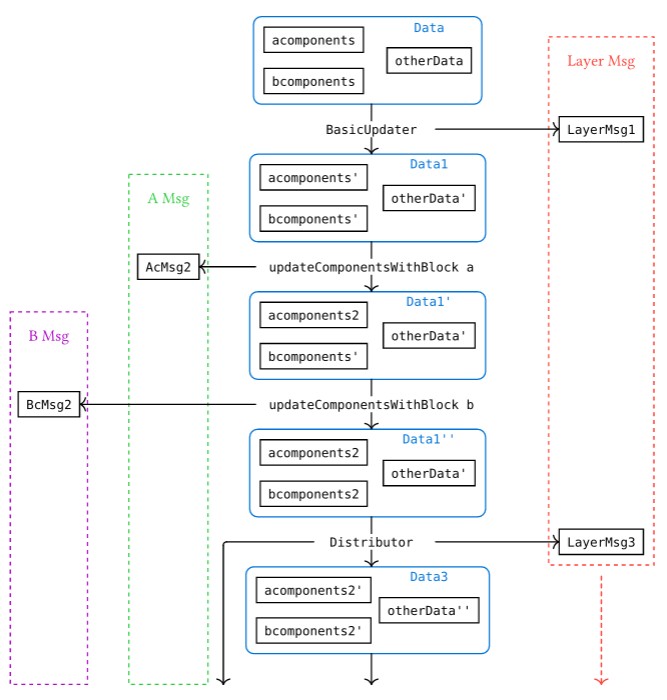
Five-Step updating strategy is used to simplify the update logic of a parent object with components (usually a layer). When developing in Messenger, managing the components could be a complex issue, especially when there are several component groups to deal with.
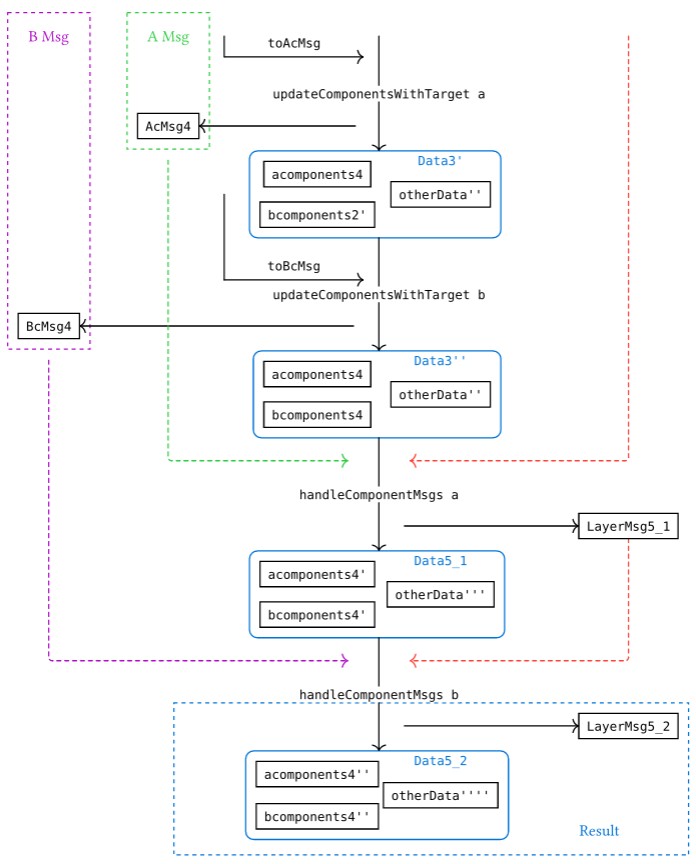
Generally, the update function in a parent object with components can be divided into five steps:
-
Update basic data (remove dead components, etc.)
type alias BasicUpdater data cdata userdata tar msg scenemsg =
Runtime -> Env cdata userdata -> UserEvent -> data -> ( data, List (MMsg tar msg scenemsg userdata), ( Env cdata userdata, Bool ) ) -
Update component groups by using
updateComponents. -
Determine the messages that need to be sent to components and distribute them (collisions, etc.)
type alias Distributor data cdata userdata tar msg scenemsg cmsgpacker =
    Runtime -> Env cdata userdata -> UserEvent -> data -> ( data, ( List (Msg tar msg scenemsg userdata), cmsgpacker ), Env cdata userdata )
where
cmsgpackertype is a helper type for users to send different types of messages to different component groups. Generally, it should be a record with a similar structure todata:type alias ComponentMsgPacker =
{ components1: List ( Components1Target, Components1Msg )
, components2: List ( Components2Target, Components2Msg )
...
}For objects that only need to manage one list of components, the
cmsgpackertype could be:type alias ComponentMsgPacker =
List ( ComponentTarget, ComponentMsg )noteDistributor type can also be useful in the
updaterecfunction. -
Update the components with the
cmsgpackerfrom step 3 usingupdateComponentsWithTarget. If there are multiplecmsgpackerresults, they need to be combined together first. -
Handle all the component messages generated from the previous steps.
Here is an example of a layer with two lists of components in different component groups:
update : LayerUpdate SceneCommonData UserData Target LayerMsg SceneMsg Data
update runtime env evt data =
    let
        --- Step 1
        ( newData1, newlMsg1, ( newEnv1, newBlock1 ) ) =
            updateBasic runtime env evt data

        --- Step 2
        ( newAComps2, newAcMsg2, ( newEnv2_1, newBlock2_1 ) ) =
            updateComponentsWithBlock runtime newEnv1 evt newBlock1 newData1.acomponents

        ( newBComps2, newBcMsg2, ( newEnv2_2, newBlock2_2 ) ) =
            updateComponentsWithBlock runtime newEnv2_1 evt newBlock2_1 newData1.bcomponents

        --- Step 3
        ( newData3, ( newlMsg3, compMsgs ), newEnv3 ) =
            distributeComponentMsgs runtime newEnv2_2 evt { newData1 | acomponents = newAComps2, bcomponents = newBComps2 }

        --- Step 4
        ( newAComps4, newAcMsg4, newEnv4_1 ) =
            updateComponentsWithTarget runtime newEnv3 compMsgs.acomponents newData3.acomponents

        ( newBComps4, newBcMsg4, newEnv4_2 ) =
            updateComponentsWithTarget runtime newEnv4_1 compMsgs.bcomponents newData3.bcomponents

        --- Step 5
        ( newData5_1, newlMsg5_1, newEnv5_1 ) =
            handleComponentMsgs runtime newEnv4_2 (newAcMsg2 ++ newAcMsg4) { newData3 | acomponents = newAComps4, bcomponents = newBComps4 } (newlMsg1 ++ newlMsg3) handlePComponentMsg

        ( newData5_2, newlMsg5_2, newEnv5_2 ) =
            handleComponentMsgs runtime newEnv5_1 (newBcMsg2 ++ newBcMsg4) newData5_1 newlMsg5_1 handleUComponentMsg
    in
    ( newData5_2, (newlMsg5_2, ( newEnv5_2, newBlock2_2 ) )