Portable Components
This feature is highly experimental. To use portable components, you need to add messenger-extra to your dependencies.
In brief, portable components are sets of interfaces that can be transformed automatically into user components. Portable components aim to provide more flexibilities on components.
The characteristics of portable components include:
- Users can use portable components across scenes and even across projects.
- Portable components could be written in a library.
- They do not have the base data.
- They cannot get the common data.
- Users need to set the
MsgandTargettype for every portable component. - Users who use portable components need to provide a codec to transform the messages and targets.
Portable components are only useful when you are designing a component applicable to many different scenes (e.g. UI element). However, if your component is tightly connected to the scene (in most cases), please use scene prototype discussed in Scene Prototype. It allows you to reuse scene and components. Think carefully whether you really need portable components before using it.
Specifically, you need to provide codecs with the following types:
type alias PortableMsgCodec specificmsg generalmsg =
    { encode : generalmsg -> specificmsg
    , decode : specificmsg -> generalmsg
    }
type alias PortableTarCodec specifictar generaltar =
    { encode : generaltar -> specifictar
    , decode : specifictar -> generaltar
    }
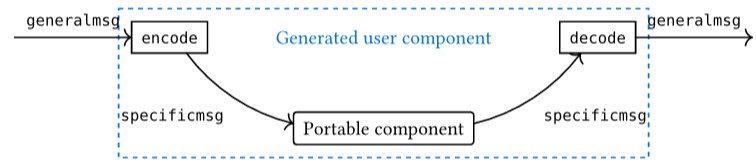
After that, users can use the function below to generate user components from portable ones:
translatePortableComponent : ConcretePortableComponent data userdata tar msg scenemsg -> PortableTarCodec tar gtar -> PortableMsgCodec msg gmsg -> bdata -> Int -> ConcreteUserComponent data cdata userdata gtar gmsg bdata scenemsg
Currently, portable components are experimental, so users need to handle portable components manually.
Example: Buttons
First, define a portable component in src/PortableComponents/Button/Model.elm, where the "button" has its own special Data, Target, and Msg. Now we want to make it into a user component held by a layer.
There is no CLI command for users to directly generate a portable component.
type Msg
    = InitData (Maybe Data)
    | Pressed

type Target
    = Other
    | Me
For this purpose, we create a function to transform "button" to a user component in Scenes/Home/Components/Button.elm with basics defined in Scenes/Home/Components/ComponentBase.elm. The ComponentMsg and ComponentTarget are defined as below:
type ComponentMsg
    = ButtonInit Button.Data
    | ButtonPressed String
    | NullComponentMsg

type alias ComponentTarget =
    String
Then, in Scenes/Home/Components/Button.elm, we define the component generator by:
component : Int -> ComponentTarget -> PortableComponentStorage SceneCommonData UserData ComponentTarget ComponentMsg BaseData SceneMsg
component zindex gtar =
    let
        targetCodec : PortableTarCodec Button.Target ComponentTarget
        targetCodec =
            { encode = \_ -> Button.Other
            , decode = \_ -> gtar
            }

        msgCodec : PortableMsgCodec Button.Msg ComponentMsg
        msgCodec =
            { encode =
                \msg ->
                    case msg of
                        ButtonInit data ->
                            Button.InitData (Just data)

                        _ ->
                            Button.InitData Nothing
            , decode =
                \msg ->
                    case msg of
                        Button.InitData _ ->
                            NullComponentMsg

                        Button.Pressed ->
                            ButtonPressed gtar
            }
    in
    genPortableComponent Button.componentcon targetCodec msgCodec () zindex
Note that gtar is used to initialize the component, and zindex is the z-index property of the created component.
Now the portable component button can be used as normal user components in the layer.
Use with User Components
To validate that the portable component type has been successfully transformed into user components, users can add a sample component.
Use the component in the User Component part and simply modify it. To make things easy, remove the id and the update logic.
When clicking the button, the rectangle is expected to turn yellow. But the logic of changing color doesn't need to be added in the update function of the button:
MouseDown 0 pos ->
    if judgeMouseRect pos data.pos data.size then
        ( data, [ Other ( OtherC, Pressed ) ], ( env, True ) )

    else
        ( data, [], ( env, False ) )
Instead, it should be added in the codec in Components/Button.elm, where the translator is stored. More specifically, to make the buttons more general, users can determine what message they should pass when initializing every single one of them:
component : Int -> ComponentTarget -> ComponentMsg -> PortableComponentStorage SceneCommonData UserData ComponentTarget ComponentMsg BaseData SceneMsg
component zindex gtar gmsg =
    let
        ...
        msgCodec : PortableMsgCodec Button.Msg ComponentMsg
        msgCodec =
            ...
            decode =
                ...
                Button.Pressed ->
                    gmsg
            ...
    in
    genPortableComponent Button.componentcon targetCodec msgCodec () zindex
Then initialize two buttons and a rectangle in one list in the layer:
init : LayerInit SceneCommonData UserData LayerMsg Data
init runtime env initMsg =
    Data
        [ Button.component 1 "Rect" (RectMsg yellow) (ButtonInit <| ButtonConfig.Data ( 0, 0 ) ( 100, 100 ) "Button 1") runtime env
        , Button.component 1 "Rect" (RectMsg orange) (ButtonInit <| ButtonConfig.Data ( 300, 300 ) ( 100, 100 ) "Button 2") runtime env
        , Rect.component ( RectInit <| RectMsg.Init 200 500 200 200 red ) runtime env
        ]
Now the requirement is simply implemented since every specific button message Other OtherC Pressed will be decoded as Other ( "Rect", RectMsg yellow ).
Find the detailed example here.
Users can even make different translators for the same portable component type to implement different usages. And the same type of portable component can be used in different scenes by setting translators for every scene. See more usages about portable components in Component Group.